This section contains additional delivery parameters that you can configure for display on the Delivery Screens. There are three screens that contains a number of parameters each. See the explanations for each below.
Delivery Details (1/4)
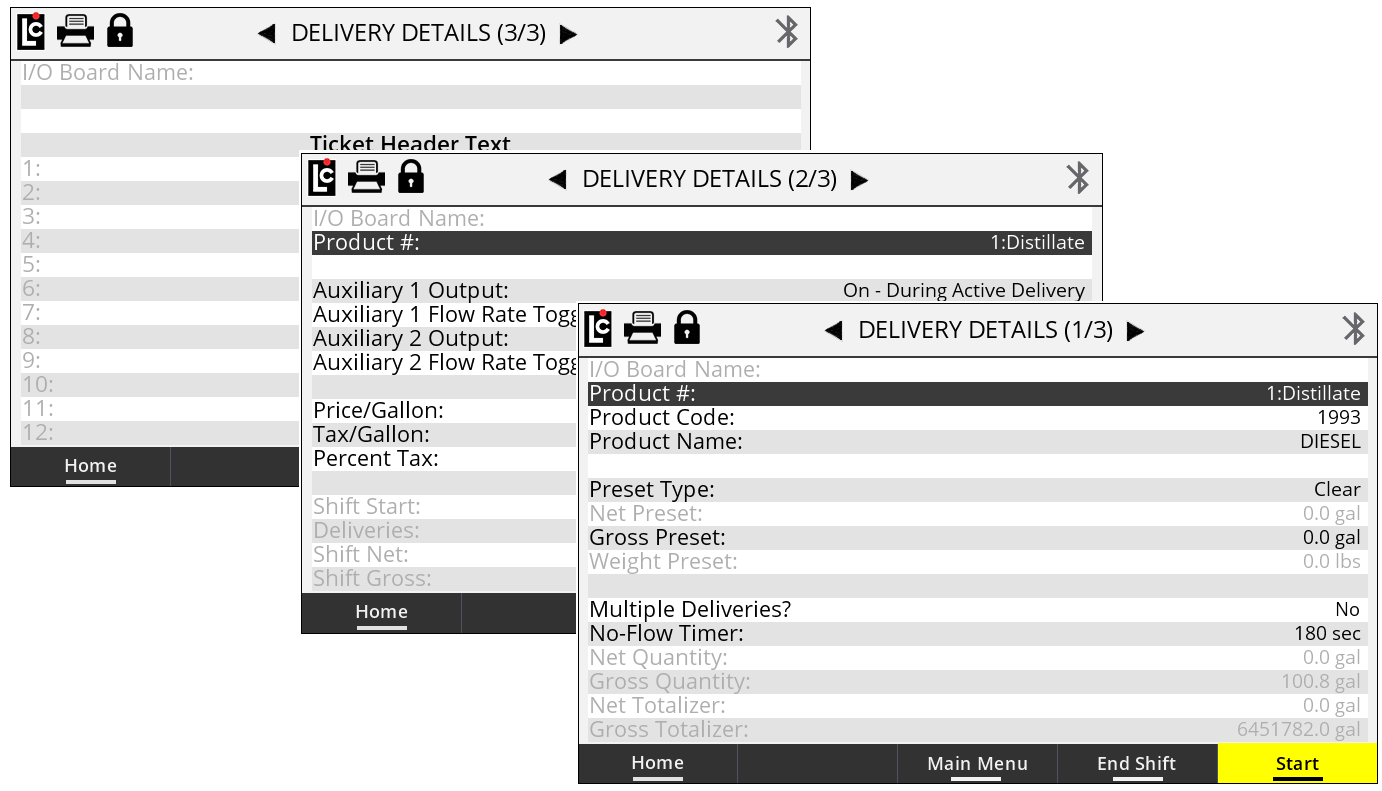
I/O Board Name
(This appears on each of the three screens)
A text field that is used to identify the currently selected I/O board in the I/O board # field. The name will display on some other screens where it is necessary to clearly identify the selected board. (Maximum - 16 Characters)
Product #
(This appears on each of the three screens)
A listing of the 16 products available for setting up and calibrating the Register.
Options: Products 1-16 are available for setup. Only setup and calibrate products that are to be used by the Register.
Product Code
A text field for identifying the selected product with a code. The product code will appear on most ticket formats to identify the product that was delivered. (Maximum - 5 Alphanumeric characters)
Product Name
A text field for identifying the selected product with a specific name. This name will appear on most ticket formats.
Preset Type
A list box for specifying how the Register will react when it reaches the preset amount. The choice here also affects when the end delivery command is sent and when the ticket will print.
Options:
•Clear – At the point when the Register reaches the preset value, the delivery ends automatically, the ticket is printed, and the preset value is set to 0.
•Multiple – At the point when the Register reaches the preset value, the delivery is paused but remains active until the user either (a) presses Resume, (b) sets a new preset and presses Resume, or (c) ends the delivery by pressing the End & Print button and the preset value is set to 0.
•Retain – At the point when the Register reaches the preset value, the delivery automatically ends, the ticket prints, and the original preset value is retained for the next delivery.
Net Preset
A numeric text field for the net preset value–if net presets are accepted and temperature compensation is active. (Maximum - 7 numeric characters)
Gross Preset
A numeric text field for the gross preset value–if gross presets are accepted. (Maximum - 7 numeric characters)
Weight Preset
A numeric text field for the weight preset value–if weight presets are accepted. (Maximum - 7 numeric characters)
Price Preset
A numeric text field for the price preset value–if price presets are accepted. (Maximum - 7 numeric characters)
Multiple Deliveries?
A list box in which you can specify if the Multiple Deliveries feature is to be on or off. If Multiple Deliveries is set to Yes, you can fill multiple tanks at one location without being affected by the No Flow Timer feature (see below. This only applies to the next delivery, and will revert back to No automatically when the delivery completes.
If this field is set to No, any deliveries will need to be within the value specified in No Flow Timer.
NOTE: There is also a printer parameter, Print Multiple Deliveries Per Site Message in Register 3/3, that is directly affected by this setting. |
No Flow Timer
A numeric-only field for specifying the duration of the No Flow Timer. This is an internal timer that begins when the Register senses that there is no longer any product moving through the meter. If this timer counts up to its set point, the Register will assume that the delivery is complete and a ticker will print automatically. The default value for this field is 180 (seconds). Deactivate this feature by entering 0 seconds, which permits filling multiple tanks at a single location simultaneously. The timer helps to ensure that deliveries are not split between authorized and unauthorized locations. If the value is set to 0–or any value greater than 180–and the Print Multiple Deliveries Per Site message is set to On, the Multiple Deliveries At One Site message will print on the delivery ticket. (Maximum - 3600 Seconds)
Price/Unit
A numeric-only text field for specifying a price per-unit. (Maximum - 7 numeric characters)
NOTE: The unit label will vary depending on the unit of measure that has been set up in the Register. |
Tax/Unit
A numeric-only text field that is used to enter a per unit tax to be applied to the volume delivered. (Maximum - 7 numeric characters)
NOTE: The unit label will vary depending on the unit of measure that has been set up in the Register. |
Percent Tax
A numeric-only text field for specifying a percent/unit tax that applies to the Price/Unit (Maximum - 6 numeric characters)
Delivery Details (2/4)
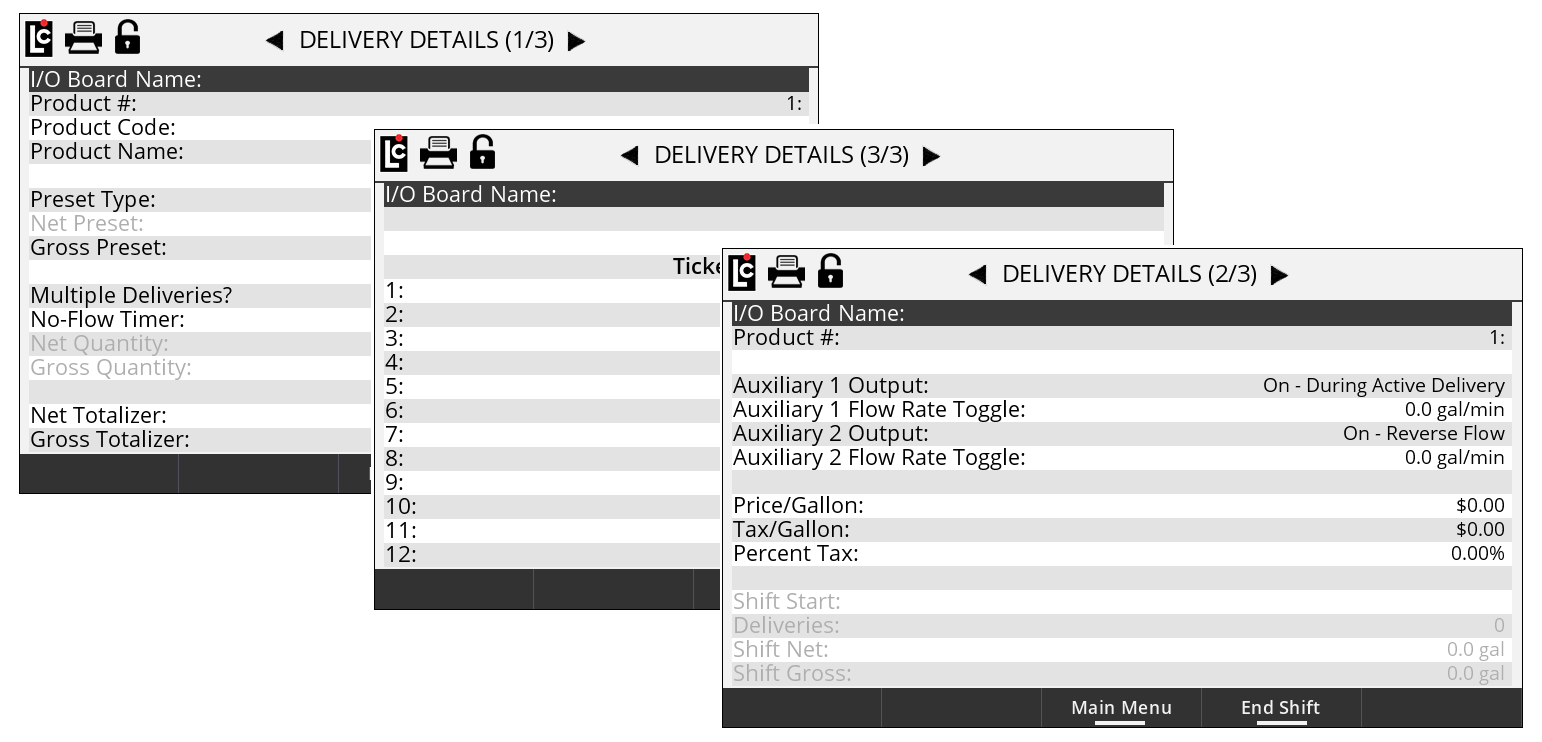
Auxiliary 1 Output
A list box that determines how any digital output that is set to AUX 1 will operate on the selected product. To control external components, there are several features in the Register that can be set to perform according to the Auxiliary 1 and Auxiliary 2 settings. This includes pumps, injectors, PTO, throttle, alarms, and reset pulse, among others.
Options:
•Off – Any output set to AUX 1 Calibration Mode Settings will always be off (inactive).
•On – Any output set to AUX 1 Calibration Mode Settings will always be on (Active and Sinking to ground).
•On - During Active Delivery – Any output set to AUX 1 Calibration Mode Settings will turn on (Sink to ground) when a delivery is started. It will turn off when the delivery is complete.
•On - During Run State – Any output set to AUX 1 Calibration Mode Settings will turn on (Sink to ground) when a delivery is active and not paused. The output will be on when a delivery begins. However, if the delivery pauses, the output will turn off until the delivery resumes. If the End of delivery command is given, the output will remain off and the delivery will end.
•On - Flow Rate Monitor – Any output set to AUX 1 Calibration Mode Settings will be on when a delivery is active. However, it will deactivate if the flow rate meets or exceeds 40 units/time. If the flow rate does not meet or exceed 40 units/time, the output will remain on.
•On - Reverse Flow – Any output set to AUX 1 Calibration Mode Settings will be off when a delivery begins. It will only turn on when the register detects flow in the negative or reverse direction.
•Reset Pulse/Delivery Start – For any delivery that uses 3rd-party remote counters requiring a reset pulse to 0.0, any output set to AUX 1 Calibration Mode Settings will output a short pulse at the start of a delivery.
•Toggle Flow Rate – Any output set to AUX 1 Calibration Mode Settings will turn on once the flow rate of the Register exceeds the set flow rate point in the Auxiliary 1 Flow Rate Toggle field. See below.
•Calibrated Scaled Pulse Output – Any output set to AUX 1 Calibration Mode Settings will be a calibrated pulse output that scales according to the Pulse Output Frequency setting in the calibration mode.
Auxiliary 1 Flow Rate Toggle
A numeric-text field that can be used to program a flow rate set point when the Aux 1 is set to Toggle flow rate. Auxiliary 1 remains activated above the set flow rate value and deactivates when the flow rate falls below the value.
A common use for this output is an air operated valve (AOV) on the pump. When the flow rate value is attained, the AOV is activated switching the pump from low-bypass pressure mode to full-flow fuel mode (high bypass pressure). When the flow rate falls below the set value, the AOV deactivates and the pump returns to low-flow.
Another possible output is the engine throttle—to increase and decrease the RPM of the pump shaft. In applications such as these, the flow rate value in this field should be below the low-flow rate with a fully open nozzle—or the output will never turn on.
Another application of this field is to set the value as a maximum flow rate at which a valve should be closed. On fuel delivery trucks, flow valves often activate an internal switch at approximately 18 GPM (68 LPM). The value of this field is unique to each product.
Auxiliary 2 Output
A listing that determines how any digital output that is set to AUX 2 will operate on the selected product. To control external components, there are several features in the Register that can be set to perform according to the Auxiliary 1 and Auxiliary 2 settings. This includes pumps, injectors, PTO, throttle, alarms, reset pulse, among others
Options:
•Off – Any output set to AUX 2 Calibration Mode Settings will always be off (inactive).
•On – Any output set to AUX 2 Calibration Mode Settings will always be on (Active and Sinking to ground).
•On - During Active Delivery – Any output set to AUX 1 Calibration Mode Settings will turn on (Sink to ground) when a delivery is started. It will turn off when the delivery is complete.
•On - During Run State – Any output set to AUX 1 Calibration Mode Settings will turn on (Sink to ground) when a delivery is active and not paused. The output will be on when a delivery begins. However, if the delivery pauses, the output will turn off until the delivery resumes. If the End of delivery command is given, the output will remain off and the delivery will end.
•On - Flow Rate Monitor – Any output set to AUX 2 Calibration Mode Settings will be on when a delivery is active. However, it will deactivate if the flow rate meets or exceeds 40 units/time. If the flow rate does not meet or exceed 40 units/time, the output will remain on.
•On - Reverse Flow – Any output set to AUX 2 Calibration Mode Settings will be off when a delivery begins. It will only turn on when the register detects flow in the negative or reverse direction.
•Reset Pulse/Delivery Start – For any delivery that uses 3rd-party remote counters requiring a reset pulse to 0.0, any output set to AUX 2 Calibration Mode Settings will output a short pulse at the start of a delivery.
•Toggle Flow Rate – Any output set to AUX 2 Calibration Mode Settings will turn on once the flow rate of the Register exceeds the set flow rate point in the Auxiliary 1 Flow Rate Toggle field. See below.
•Calibrated Scaled Pulse Output – Any output set to AUX 2 Calibration Mode Settings will be a calibrated pulse output that scales according to the Pulse Output Frequency setting in the calibration mode.
Auxiliary 2 Flow Rate Toggle
A numeric-text field that can be used to program a flow rate set point when the AUX 2 is set to Toggle flow rate. Auxiliary 2 remains activated above the set flow rate value and deactivates when the flow rate falls below the value.
Shift Start
A read-only field that displays the time and date that the current active shift began.
Deliveries
A read-only field that displays the number of deliveries made during the currently active shift. This value will reset each time the Clear-Shift command is given and the shift ticket prints.
Shift Net
A read-only field that will display the total net volume that was delivered during the currently active shift. This value will reset each time the Clear-Shift command is given and the shift ticket prints.
Shift Gross
A read-only field that will display the total gross volume that was delivered during the currently active shift. This value will reset each time the Clear-Shift command is given and the shift ticket prints.
Net Quantity
A read-only numeric field that displays the current net delivery quantity.
Gross Quantity
A read-only numeric field that displays the current gross delivery quantity.
Net Totalizer
A numeric-text field that display the current accumulative net totalizer value of the selected product. This is a non-resettable totalizer. However, it is programmable in the Weight and Measures (Calibration) mode–if reprogramming is necessary. (Maximum - 9 numeric characters)
Gross Totalizer
A numeric-text field that displays the current accumulative gross totalizer value of the selected product. This is a non-resettable totalizer. However, it is programmable in the Weight and Measures (Calibration) mode–if reprogramming is necessary. (Maximum - 9 numeric characters)
Delivery Details (3/4)
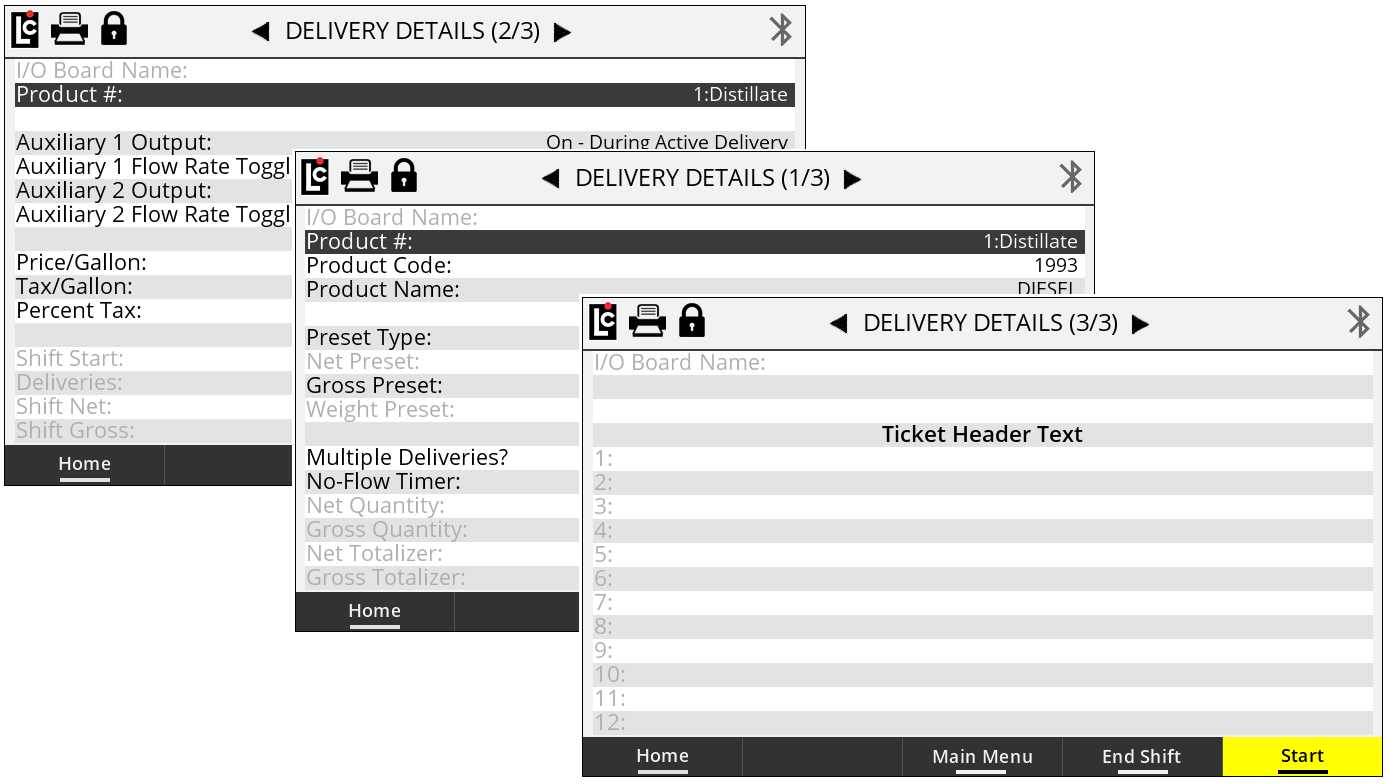
Ticket Header Text 1-12
Each ticket header line is an alphanumeric text field that is available for entering data that will print at the top of each ticket. Typically, this is useful for printing the company name, address, phone number, email, etc of the marketer. You can enter up to 12 lines of header text, and also insert blank lines between lines of text.
Header lines 11 and 12 are for Auxiliary 1 (Header 11) and Auxiliary 2 (Header 12). These are programmable only when the Register is in the calibration mode. Use these lines to print a specific message on the ticket when triggered by the either of these Auxiliary settings: On, On During Delivery, or On During Run State.
Delivery Details (4/4)
Ticket Footer Text 1-8
Each ticket footer line is an alphanumeric text field that is available for entering data that will print at the bottom of each ticket. You can enter up to 8 lines of footer text, and also insert blank lines between lines of text.
End Shift
Pressing the End Shift function key to end the shift. Respond to the prompt “Are you sure you want to end your shift?” with either the Yes or No function keys:
•No - Returns the Register back to the Delivery Details screen.
•Yes - Prints the end-of-shift ticket if a ticket printer is available and ready.