Printer Installation (J1 RS-232)
A Liquid Controls meter system with a LCR 600 typically includes an Epson slip printer or roll printer. The installation is the same for either printer.
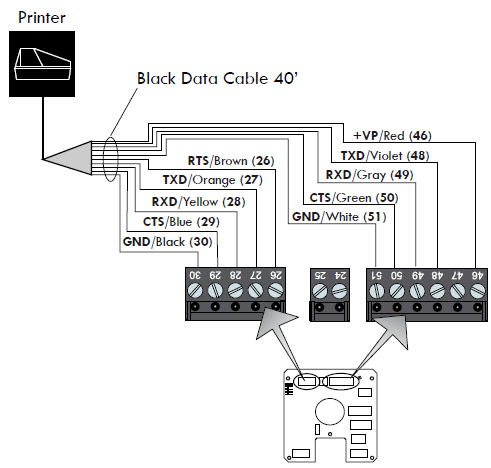
An LCR 600 is typically shipped with a black-sheathed data cable prewired to terminals J1 and J3 on the LCR 600 CPU board.
See instructions in Routing Data and Power Cables for routing the data cable from the back of the truck to the cab.
Do NOT Try to Remove J2 |
The J2 terminal block is permanently attached to the CPU board. |
Follow these steps to install the printer:
1.Find a convenient mounting spot in the truck cab where drivers can easily operate the printer.
2.Clean the mounting spot and the bottom of the printer with alcohol for the best stick.
3.Attach the Velcro to the mounting spot and the bottom of the printer and fasten the printer to the mounting spot.
4.Connect the data cable to the RS-232 data port on the back of the printer.
Routing Data Cables |
See the instructions on Routing Data and Power Cables for routing the data cable from the back of the truck to the cab. |
Disconnect Power |
Disconnect the power before working on the CPU board. |
RS-232 Communication |
To communicate by means of genuine RS-232 protocol, the +VP Red wire must be connected to the J3 terminal block at terminal 47 (not 46). |
To install the printer:
1.Find a convenient mounting spot in the truck cab where drivers can easily operate the printer.
2.Clean the mounting spot and the bottom of the printer with alcohol for the best stick.
3.Attach the Velcro to the mounting spot and the bottom of the printer and fasten the printer to the mounting spot.
4.Connect the data cable to the RS-232 data port on the back of the printer.
Connecting Power |
To connect power to the printer, see Power Supply. |
Epson Printer Ground Wire Kit Installation
Before connecting power to the LCR 600 and the Epson printer, ground the printer to the truck cab floor. Epson printers sold for truck installations are all grounded in the same manner.
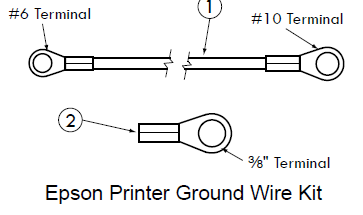
- 82184 - Epson Printer Ground Wire Kit |
|||
# |
Description |
Part Number |
Quantity |
1 |
Ground Wire |
84101 |
1 |
2 |
Terminal (.375 ring, 16GA) |
71878 |
1 |
To ground an Epson printer:
1.Remove one of the mounting bolts that fasten the printer mounting brackets to the truck cab floor.
2.Place one end terminal of the ground wire over the mounting bolt and return the bolt to its original place.
3.At the back of the Epson printer, remove the silver ground screw marked “FG”.
4.Place the other end terminal of the ground wire over the ground screw and return the screw to its original place.
5.Check the strap for a good ground connection (see page 13).
Additional Terminal |
The Epson Printer Ground Wire Kit contains an additional ⅜" ring terminal for printer brackets that are not purchased from Liquid Controls. |