This manual provides instructions for the installation, operation, and maintenance of the LectroCount XL LED Remote Display. LectroCount XL LED Remote Displays display the volume of metered product in a six-digit configuration of high-intensity LED lights. The 2¼-inch digits are viewable at up to 250 feet from the display.
NOTE: Throughout this guide, the XL LED Remote Display is referred to as “Display” (unless otherwise specifically referenced by name). |
Features
•6-digit, high-intensity LED display with 2¼-inch display characters
•Viewable from up to 250 feet
•30-foot, four-wire, shielded cable
•Weatherproof NEMA 4X enclosure
Model Numbers & Device Compatibility
The four models of the LectroCount XL LED Remote Display are compatible with all current and legacy LectroCount registers, solid-state quadrature pulsers, solid-state single channel pulsers, and the LCMag™ HML210 converter.
LectroCount XL LED Remote Display Compatibility
 |
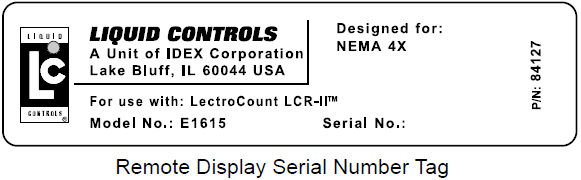
VERIFY COMPATIBILITYTo ensure that the LectroCount XL LED Remote Display with the device to which it will connect, verify the model number on the serial number tag. The serial number tag can be found on the top of display, as shown in the figure below. |
The display is compatible with these devices:
•E1615 LectroCount LCR® 600 and LectroCount LCR-II
•E1616 LectroCount LCR, LectroCount3
•E1616 Quadrature pulsers (solid-state and calibrated)
•E1616 LCMag HML210 and single-channel pulsers (solid state and calibrated)
Prior to installation, ensure that the model number of the LectroCount XL LED Remote Display is compatible with the device that you are connecting. If the display model is incompatible, the display will not work and damage could occur when you power it on.
|
 |
Models E1615, E1616, E1617, E1618 of the LectroCount XL LED Remote Display render LectroCount LCD Remote Display models E1610, E1611, E1612, and E1613 obsolete.
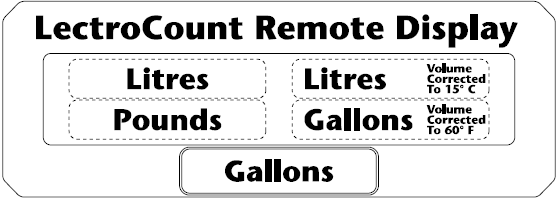
Remote Display LabelEach shipment of the LectroCount XL LED Remote Display includes a set of four (4) additional display labels. At the factory, all displays receive the Gallons label. If necessary, choose one of the additional labels and simply place it over the Gallons label. |
 |
Verify Contents in Each Shipment
Before installation, check your shipment against the packing list to ensure that no parts are missing. The packing list is included in the same red information packet as this manual.